The Daily OS Video Tutorial · build your own operating system

Build the system that starts your day already sorted.

Think about where your week actually goes. Typing up notes after every meeting. Writing the same update three ways. Checking four tools to work out what needs you today. This video tutorial walks you through building your own daily operating system, step by recorded step. Watch over our shoulder, pause, copy the setup, switch it on. By Monday morning the brief writes itself.

6 short modulesBuild it in a weekendYours foreverFree
what your Monday looks like after one weekend of building

It's the setup a good executive assistant would give you, free, in a weekend.

What you're building

Your day, untangled.

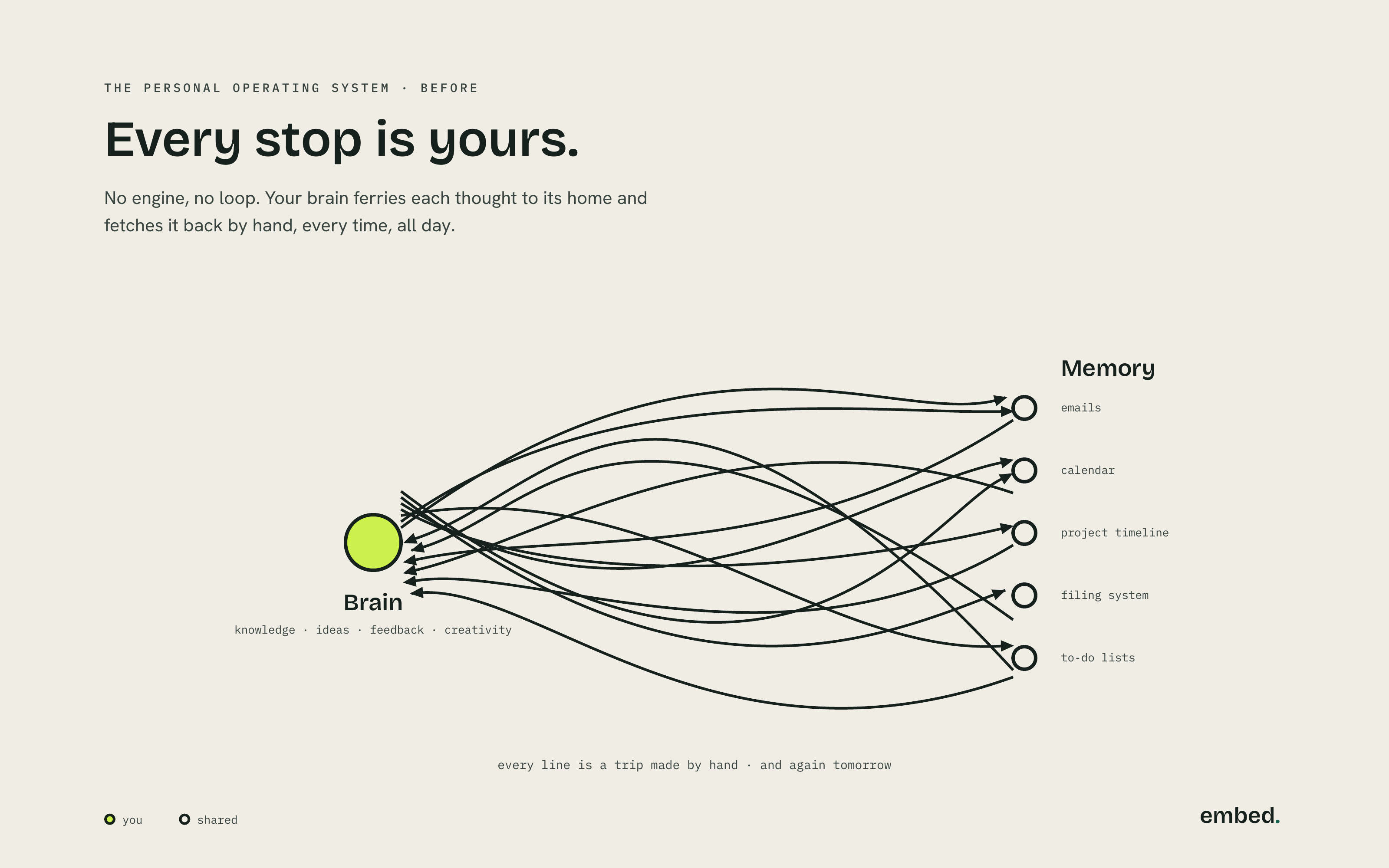
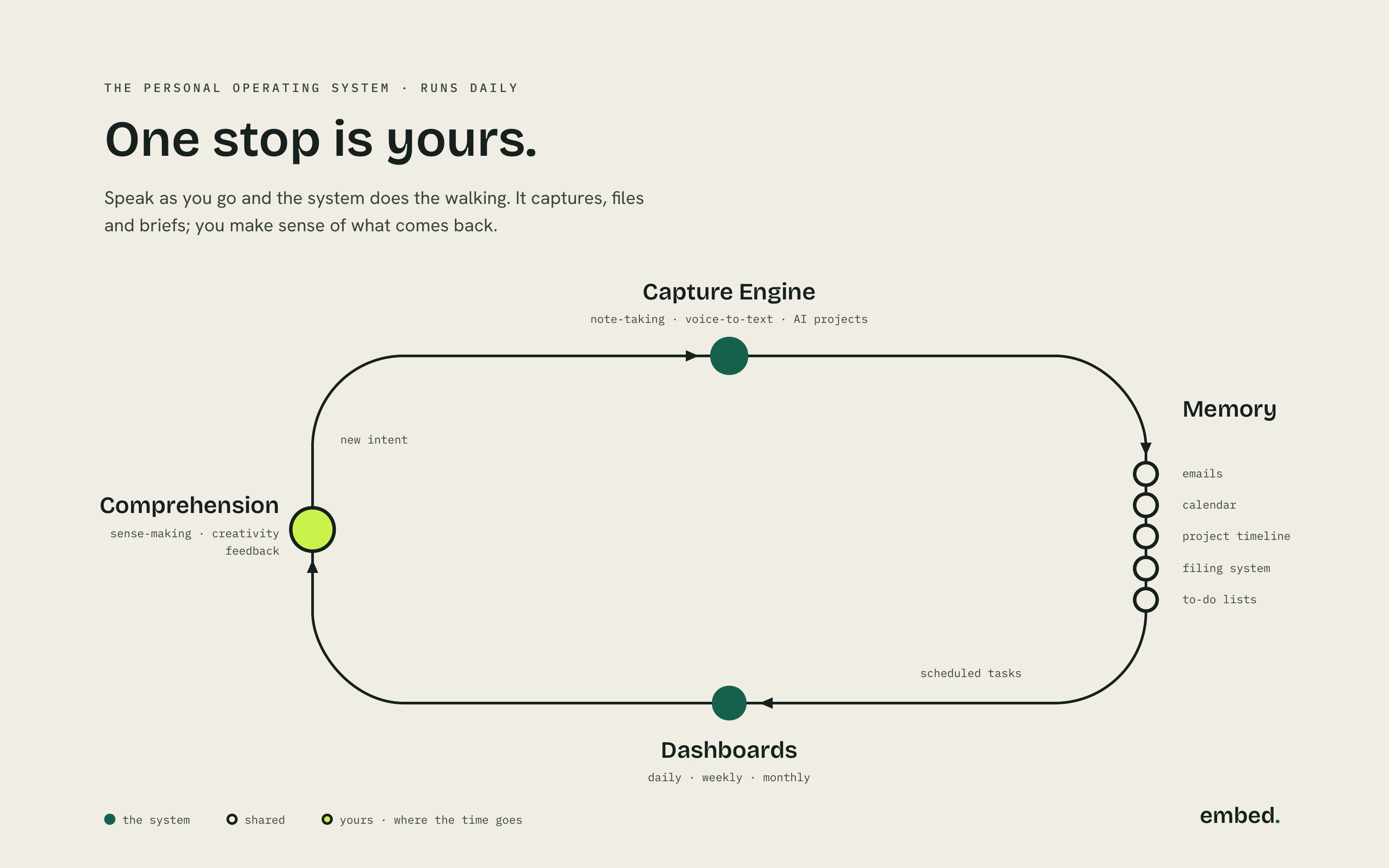
Today your brain is the router. It carries every note, date and file between five different homes, all day. The system you'll build closes that loop: capture once, let memory live where it lives, read one dashboard, and keep the one stop only you can run. Comprehension. The tutorial builds it with you, one stop at a time.

Before diagram: thirteen tangled lines run both ways between your brain and five memory homes. Headline: Every stop is yours.
before · every stop is yours
After diagram: one clockwise loop through Capture Engine, Memory, Dashboards and Comprehension. Headline: Start your day sorted.
after · start your day sorted
What's inside

Six short modules. One working system.

Every module is a screen recording you build along with. Pause, copy the setup, press play again. Around two and a quarter hours all up, and none of it is theory.

Module 00 · 12 min

The loop, on one page

What you're building and why it works: the four stops, the tools you'll need, and what your week looks like when it's running. Watch this one with a cuppa.

Module 01 · 28 min

The capture engine

Voice-to-text on every device, one capture habit, and AI projects that tidy and file what you say. Speak your notes once and never type them up again.

Module 02 · 24 min

Memory, left where it lives

No giant migration. Your emails, calendar, project timeline, filing system and to-do lists stay put. You'll wire the system to read them where they are.

Module 03 · 26 min

Dashboards you'll actually read

One page for today, one for the week, one for the month. Built from your real work, so checking in takes a minute instead of a lap of four tools.

Module 04 · 31 min

The morning brief

The big one. Scheduled tasks that read your day overnight and land a one-minute brief at 9:00: what needs you, what's ready, what handled itself.

Module 05 · 14 min

Comprehension, kept yours

The stop the system never touches. A ten-minute weekly review that keeps the loop honest, plus how to tune it as your work changes.

Also in the box

The prompt pack, templates and setup checklist

Every prompt from the videos ready to paste, the dashboard and brief templates, and a printable checklist so you always know your next step. Lifetime updates included, and every update is free.

A day with it

The scramble, rewritten retired.

Here's the shape of an ordinary Tuesday once your build is live.

9:00am

The brief lands

One minute of reading. You know the three things that matter today, and you don't open twelve tabs to find out.

11:30am

Notes, spoken

Back from a meeting, you talk for ninety seconds. The notes write themselves up and file where they belong.

2:15pm

The update, drafted

The funder update starts at eighty percent done. You spend your time on judgement, never on the blank page.

4:45pm

Actually finished

Your day shows as done. Nothing is waiting to be typed up tonight, and tomorrow's brief is already brewing.

What it deletes

The maths is silly.

The product is the admin that stops existing. Build the system once and it hands back five-plus hours a week, permanently. The tutorial is free, so every one of those hours is pure profit from your first Monday brief on.

Track your own week for a fortnight after the build and itemise it yourself. That's Module 05's homework.

embed. workflows that pay for themselves · the daily os tutorial
typing up notes after meetings+1.5 hrs/wk
first drafts from a blank page+1.5 hrs/wk
writing the same update three ways+0.75 hrs/wk
checking four tools for what's next+1.0 hrs/wk
hunting for the latest version+0.5 hrs/wk
returned to your week5.25 hrs/wk
typical build, measured over a fortnight · your week will differ
keep this receipt
The quiet engine

You build the rhythm. The tech stays in the background.

Under the hood it's a small set of modern tools, wired together so they feel like one thing. You don't need to learn AI. The tutorial sets each piece up with you, click by click, guardrails included.

Voice dictation

Fast, accurate speech to text, so your notes get made in the hallway, on the road, wherever the work happens.

Claude

The drafting and summarising engine, set up with your tone, your templates and firm guardrails around sensitive information.

Your work tracker

The one place it all lands, built on the tools you already use wherever possible, Zapier included.

the tutorial covers safe setup for people who hold sensitive community data · clear usage guardrails · ai is the engine, never the pitch

How the weekend goes

Watch. Build. Wake up to it.

No cohort, no start date, no waiting. Sign up, press play, and build at your own pace. Most people do it across one unhurried weekend.

Sat

Morning · watch and capture

Modules 00 to 02 with the checklist beside you. By lunch, voice capture is on every device and your memory homes are wired in, right where they already live.

Sun

Afternoon · dashboards and the brief

Modules 03 and 04. You build the one page you'll read each morning, then schedule the tasks that write your brief overnight. Set it, then close the laptop.

Mon

9:00am · the brief lands

One minute of reading with your coffee. What needs you, what's ready, what handled itself. Module 05's ten-minute weekly review keeps it running for good.

You give
Your email and a weekend

Two and a quarter hours of video, a build-along checklist, and the willingness to try a new rhythm on your real work.

You get
5+ hours a week

Back in your week, permanently. It starts paying off the first Monday morning, and keeps paying after that.

Free · sent to your inbox$0

Six modules, the prompt pack, all templates, the setup checklist and lifetime updates. Yours forever, watch as many times as you like. Pop in your name and email and we'll send you the whole tutorial, free.

no spam · unsubscribe any time
Who it's for

Made for one stretched person. Built by that person.

You run ops or lead a small org, and too much of your week is admin and writing.
You're comfortable following a screen recording. Copy, paste, click where we click. That's the whole skill ceiling.
You want AI helping safely and quietly, tuned to you, never becoming a second job.
Good to know

Questions we hear a lot.

Do I need to be technical?

No. If you can follow a screen recording and copy-paste, you can build this. Every module shows the exact clicks, every prompt is in the pack ready to paste, and the checklist tells you what's next when you lose your place.

What tools do I need, and what do they cost?

Voice dictation, Claude for drafting and summarising, and one work tracker, connected to the tools you already use wherever possible, Zapier included. Module 00 lists free options for every piece. Most builds run on free tiers plus whatever you already pay for.

How long does it really take?

Around two and a quarter hours of video, and roughly double that while you pause and build along. Most people finish across a weekend. Doing one module an evening for a week works just as well.

Is sensitive data safe?

Yes, and the tutorial treats it that way from the first module: clear guardrails on what the assistant can see, a written usage policy you can adapt, and plain rules on where the lines are. Protecting your people is part of the build, never an add-on.

What if it doesn't work for me?

Build it, run it for a fortnight, and if it hasn't handed you back at least an hour, no harm done. Keep the templates either way. It cost you nothing but a weekend.

Is it really free? What's the catch?

Really free. No payment, no subscription, no upsell inside the videos, lifetime updates included. We just ask for your name and email so we can send it to you and let you know when there's an update. The catch is on your side of the deal: you have to press play and build the thing.
The payoff

Monday, 9:00am. You already know your day.

The brief is on your screen, the notes filed themselves, and the first draft is waiting. One weekend of building, five-plus hours back every week after. The tutorial is free and yours forever.

Get the tutorial · free →
instant access · sent to your inbox · free